

API behavior
The node exposes HTTP endpoints and a WebSocket event stream. The diagram shows lifecycle commands and their observed results; see the API reference for payloads and response codes.
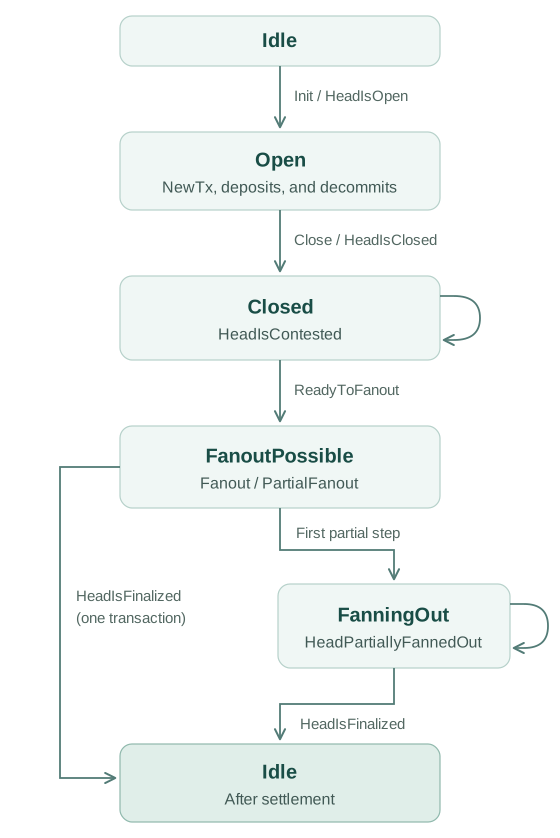
Boxes use API status names. ReadyToFanout announces FanoutPossible;
HeadIsFinalized returns the node to Idle.
Deposits and decommits leave the head open. Observe CommitFinalized or
DecommitFinalized for their settlement. During fanout, use
HeadPartiallyFannedOut to track progress and HeadIsFinalized for completion.
See selective fanout.
The diagram omits outputs that do not change the lifecycle, including
Greetings, detailed transaction results, and network status. An invalid command for
the current state produces CommandFailed; malformed input produces
InvalidInput.
API configuration
There are some options for API clients to control the server outputs. Server outputs are controlled using the following query parameters:
history=yes-> Replays historical outputs on connection. All server outputs are recorded, but a connecting client is sent only the outputs produced from then on unless it asks for the history withhistory=yes.snapshot-utxo=no-> In case of aSnapshotConfirmedmessage theutxofield in the innerSnapshotwill be omitted.encoding=cbor-> All messages on this connection are exchanged as binary WebSocket frames containing a compact CBOR encoding instead of JSON text frames. Each message starts with a text tag identical to the JSONtagvalue, followed by the constructor fields in declaration order. HTTP endpoints negotiate the same encoding per request viaContent-Type: application/cbor(request bodies) andAccept: application/cbor(responses). Note that combined withsnapshot-utxo=no, the snapshotutxois sent as an empty set rather than omitted.address=$address-> In the case of aSnapshotConfirmedmessage, it will be filtered out unless one of itsconfirmedtransactions involves the provided address, either paying to it or spending from it. Spending is recognised from the transaction's signatures, so it is detected for key addresses and not for script addresses. A snapshot that confirms no transaction, such as one settling only a deposit or a decommit, carries no address at all and so is not filtered out. No other message is filtered, including messages that do carry a transaction such asTxInvalidandDecommitRequested. Anaddressgiven without a value, as in?addressor?address=, is ignored rather than applied as a filter that matches nothing.
Replay of past server outputs
A hydra-node records all server outputs in persistence, and a client that asks for them with history=yes gets them replayed on connection so it can re-establish its state. Some of those outputs are obviously no longer relevant when replayed, NetworkConnected and NetworkDisconnected being the clearest examples. To make the end of the replayed history recognisable, client applications can use the Greetings, which is emitted after the history on every connection. See the hydra-tui example client for how this is handled.
Replay is opt-in: a client that passes no history parameter receives only the Greetings and the outputs produced from then on.
For example, a client that wants the server history from a local hydra-node but no utxo display in SnapshotConfirmed messages would connect on the default port 4001 with the full path ws://localhost:4001/?history=yes&snapshot-utxo=no.